Issue: Output type triggering for each Material Document item which is causing duplicate Idocs as each Idoc has the data of all the items of the Material Document.
Solution: Although this issue won’t make any impact on the interface, it will cause confusion and consume memory due to thousands of duplicate idocs.
You can avoid this issue by assigning standard Requirement number 173 to the output type in Output procedure. You need to the configuration setup in the SPRO configuration path mentioned below.
IMG Reference -> Material Management -> Inventory Management and Physical Inventory -> Output Determination -> Maintain Output determination procedures

Here you need to assign 173 to your customized output type.
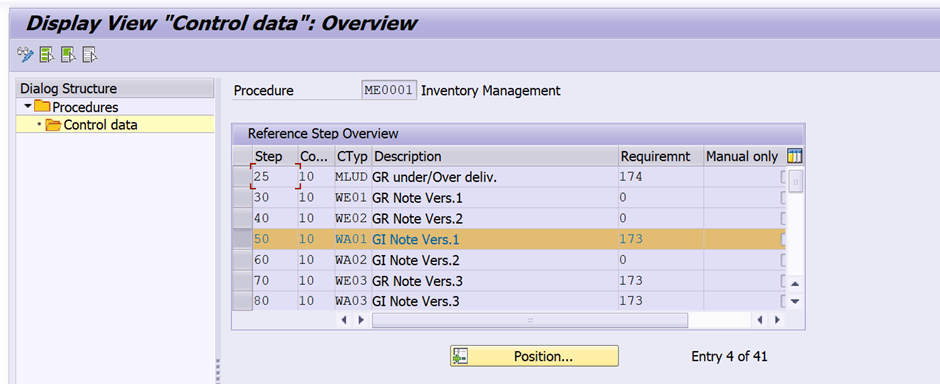
You can click on Source Text button by selecting the requirement to see the coding details.

Standard coding for Requirement 173 for your reference.

You can search as Ganesh Padala on YouTube and Udemy to find our hundreds of SAP Videos.
For my SAP MM Videos: https://rb.gy/xnjaw
Thanks, and Best Regards,
Ganesh
Discover more from GANESH SAP SCM
Subscribe to get the latest posts sent to your email.