Issue/Requirement: Availability check needs to consider the Stock Transport requisition. Confirmed quantity is blank for the Purchase Requisition. Generally Stock Transport Order is considered for Availability check but not requisition.
But if you activate immediate outbound delivery creation from STO where STO creation won’t be allowed without stock. In this case, business may expect to consider Stock Transport Requisition during availability check.
Root Cause: Availability check related configuration is not done for the Stock transport Requisition.
Solution:
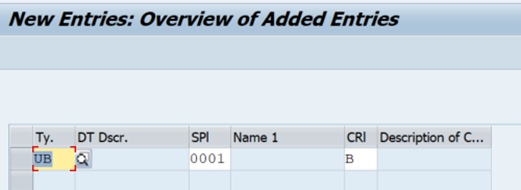
Configuration: Checking rule needs to be assigned to the combination of Stock Transport Requisition document type and Supplying Plant.
SPRO Reference IMG –> Material Management –> Purchasing –>Purchase Requisition –> Setup Stock Transport Requisition –> Assign Checking Rule

Now maintain the Stock Transport Requisition Document type, Supplying Plant and Checking Rule – B as shown below and save.
Testing:
Create Purchase Requisition with ME51N Transaction Code
Ensure the PR is created with both Supplying Plant and Storage Location. You can see the confirmed qty as shown in the below screen from ME51N.
PR Item screen if the availability check is not active:
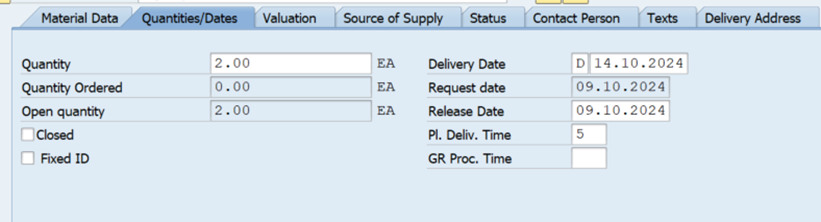
PR Item screen if the availability check is active:

Note: If you have any open PRs which needs to be updated with confirmed quantity, you can do with V_V2 transaction code in SAP.
Go to V_V2 and input the Materials and Plant as per the below screen and execute. It will update the confirmed qty.

Best Regards,
Ganesh Padala
Search as Ganesh Padala in Google or Udemy Business to find hundreds of SAP Videos. Happy Learning.
 GANESH SAP SCM