Dear All,
I am sharing the step by step by process to request Udemy Business team if you don’t find any course among the courses available in Udemy Business.
- Go to the link – https://business-support.udemy.com/hc/en-us/requests/new?ticket_form_id=9714951303191&type=user to get the below screen. Ensure you have these details on the screen as soon as you click on the link.
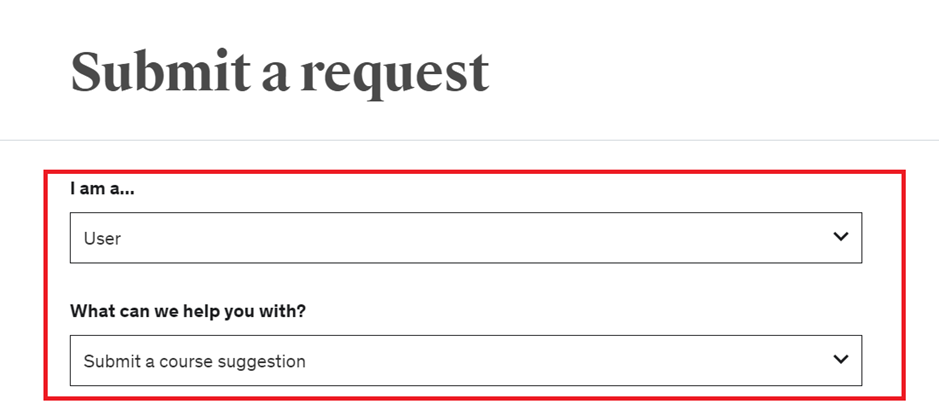
2. Click on Continue to Contact Form

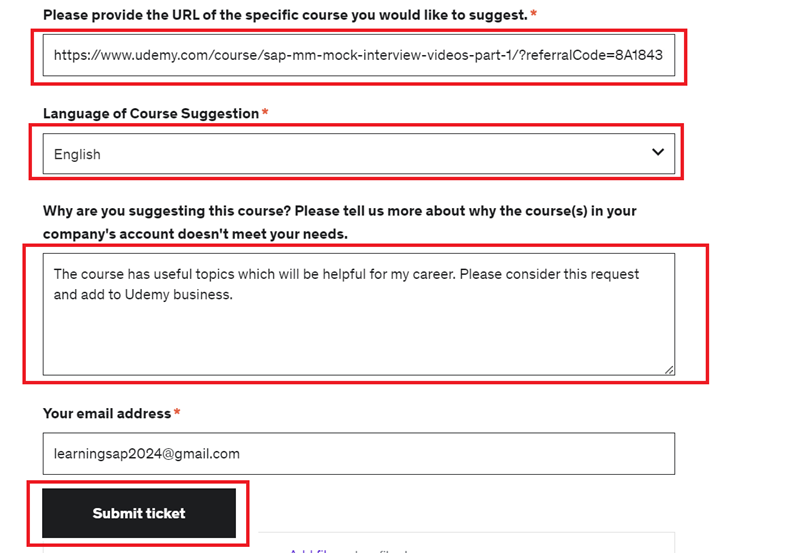
3. Fill the details as shown below
- Input the Udemy course link which you want to add.
- Select the language like English.
- You can put any comments or justificaiton about the course you are requesting.
- Finally click on Submit ticket.
Once you submit the ticket, team from Udemy Business will start reviewing the course. If the course fulfils all the requirements, they will add to Udemy Business.
Happy Learning.
Thanks and Best Regards,
Ganesh Padala
 GANESH SAP SCM