Business Requirement: Purchase info record should be maintained at Purchasing organization level only but not at Plant level. This helps to maintain the same price across the plants in a company code where only one purchasing organization is available.
Solution: You need to maintain the option – No plant-related conditions allowed in the below configuration.
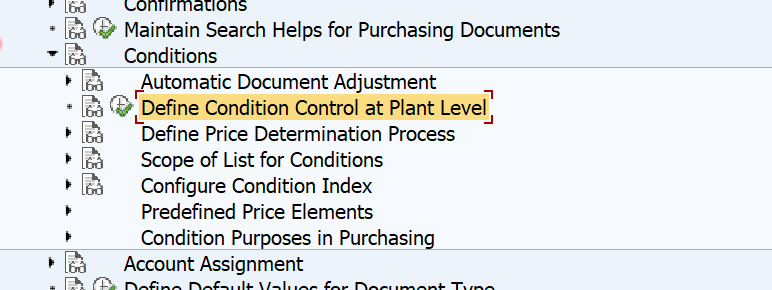
SPRO–> Material Management –> Purchasing –> Conditions –>Define Condition Control at Plant Level
Now you select the Plant for which you want to activate this function.
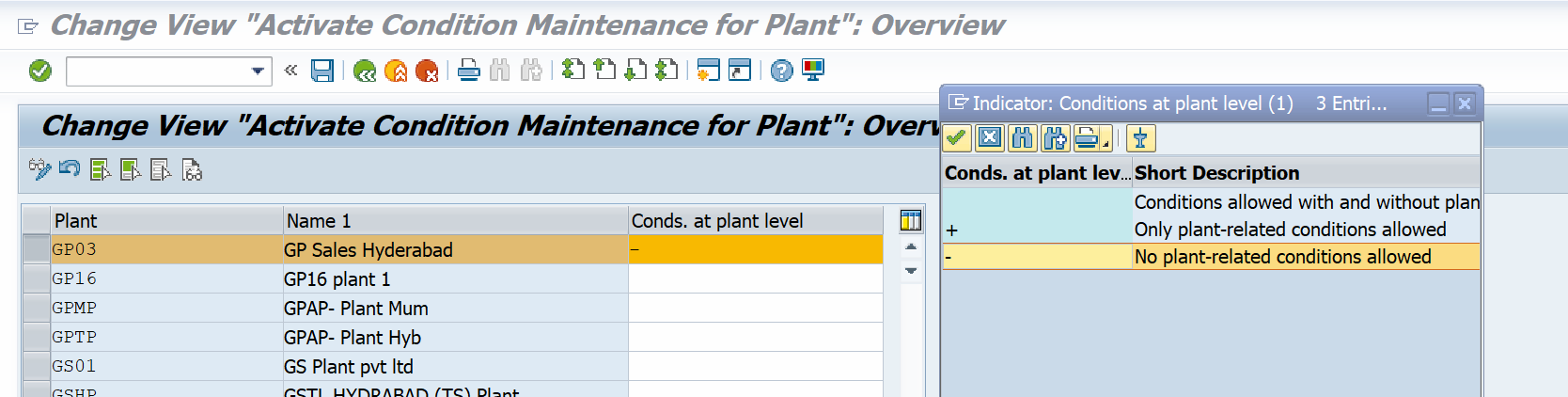
Details about the Conditions at Plant Level in Purchase Info Record:
This configuration is used to define time-dependent conditions for a purchasing organization or a plant. This means that you can allow prices that apply only to a specific plant in purchasing info records or outline purchase agreements.
- Conditions allowed with and without plant. – This is standard SAP default setting. This allows based on the standard settings. You can control during PIR creation whether you need at Plant level or Purchase organization level.
- + Only plant-related conditions allowed – This option makes the Plant to get the conditions if you maintain at Plant level only
- – No plant-related conditions allowed – This option is used if the company does not need plant specific pricing conditions in PIR. If there is such stringent requirement to get the price from Purchasing organization only. System will give the below error during PIR maintenance at Plant level.
Plant info records may not be used in plant xxxx – Message No. 06716
Standard settings
In the standard system, you can store time-dependent conditions with or without a plant. This means you can define the vendor’s conditions for a material in the purchasing record at the level of the purchasing organization and plant.
Recommendation:
You should disallow plant conditions only if you are sure that you have the same conditions for all the different plants.
Best Regards,
Ganesh Padala
 GANESH SAP SCM