Purpose of the Report: ME2A report is used by the business to monitor the Purchase Orders which don’t have sufficient Inbound Deliveries as per the PO quantity.
Issue: No output for the Report- Monitor Vendor Confirmations – ME2A


Solution:
ME2A report is useful to get the list of Purchase Orders without Inbound Delivery or with inbound delivery in which the qty is less than the PO Qty.
Go to the below configuration and maintain Monitoring for Vendor Confirmation – Value in days that specifies by when a confirmation must be received.

Now select required confirmation control key and click on Confirmation sequence.
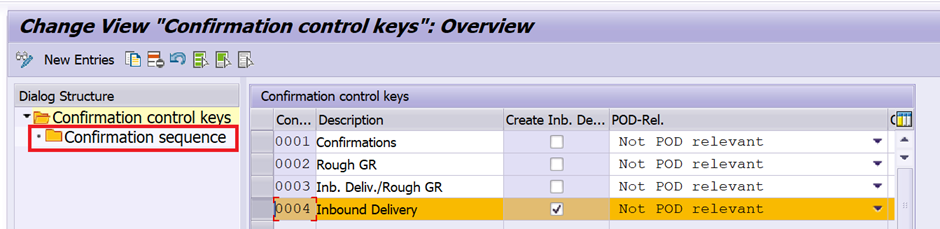
You input as per the business requirement and save.
If you set the parameter to 5 days and the reference date is set to
1- ‘PO Date plus monitoring time’, the confirmation must arrive within 5 days from the PO creation date.
2- ‘delivery date minus monitoring period’, the confirmation must arrive 5 days prior to the delivery date.
If no confirmation has been received by then, this PO item will appear in the analyses for the monitoring and follow-up of confirmations.
Note: System will accept monitoring period as blank (it considers as Zero) also.

Now you can see the output of the report as per the design.
Thanks and Best Regards,
Ganesh Padala
 GANESH SAP SCM